
All features

Make the point

Numbered steps with movable notes

Show an order of actions with numbers, letters or dots, and give each step its own caption.

The result
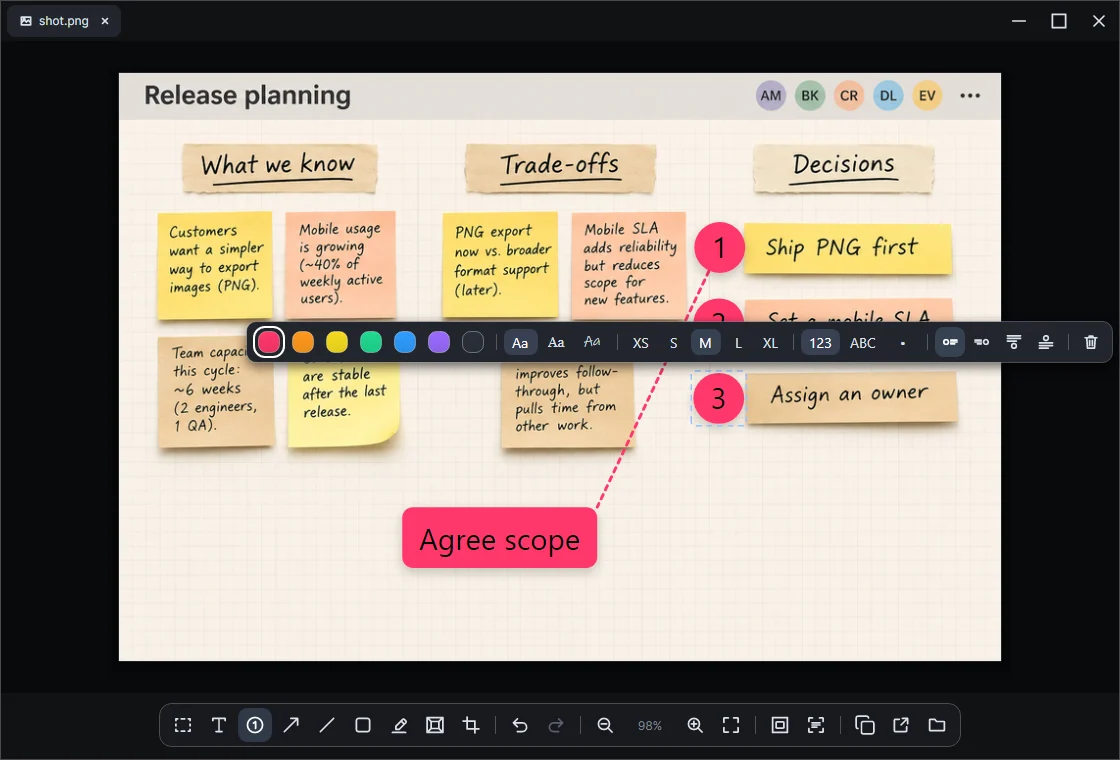
PIJO step marker with its caption moved away and a dotted connecting line
The note can sit in open space while a dotted leader keeps it connected to the step. View full size

How to use it

  1. Press N in the editor, then click to place a step.
  2. Type its caption and press Esc or Ctrl + Enter to finish. Click again to place the next step.
  3. Drag the note away from the badge when you need more room. Select the badge to restyle it.

Options

Sequence
123 for numbers, ABC for letters or dots without a sequence. Removing a numbered or lettered step renumbers that series.
Ink
Rose, Amber, Citrus, Mint, Sky, Lilac or Graphite. These are fixed presets, with no colour picker.
Font and size
Golos Text, Georgia or Ink Free, with five sizes: XS, S, M, L and XL.
Text colour
Black or white, independently of the badge ink.
Caption position
Right, left, above or below the badge. Drag it away for a detached note with a dotted leader.

Good to know

Type words into the caption, not the number. PIJO manages the sequence so later steps stay in order.